One video podcast episode can give you weeks of social content. The hard part is finding the right 45 seconds inside a 40-minute conversation.
Quick answer: To turn podcast into shorts with AI, upload the full episode to an AI clipping tool. Set a 9:16 ratio and review the suggested clips. Keep only clips that make sense alone. Then fix hooks, framing and captions by hand, and export for Shorts, Reels and TikTok.
In this guide, I’ll show you exactly how I turn podcast into shorts with AI. It starts with one full episode. AI gives me a long shortlist of candidate moments. Then a human review cuts that list down to a small set of publish-ready Shorts and Reels.
If you’ve been searching for how to turn long podcast into short clips without losing meaning, start here. It’s also the simplest way to repurpose podcast content without recording anything new.
A typical podcast episode recorded at Delenzo Studio:
- Duration: 30 to 45 minutes
- Speakers: 2 (host and guest)
- Language mix: Mostly Urdu, with English technical terms and some Roman Urdu
- Recording resolution and format: 1080p or 4K, 25 or 50 fps, MP4
- Recorded in: A treated studio, one mic per speaker
- AI candidates vs clips published: Roughly 10 to 15 suggestions, 3 to 5 published
That length range matches the wider industry. WhichPodcast’s analysis of 10,764 podcasts put the median episode at 31 minutes, with an average of 38 minutes.
One rule before we start. AI podcast clips save hours of scrubbing through footage, but none of mine go live without a manual edit. AI finds and formats the candidates. A person makes the final call.
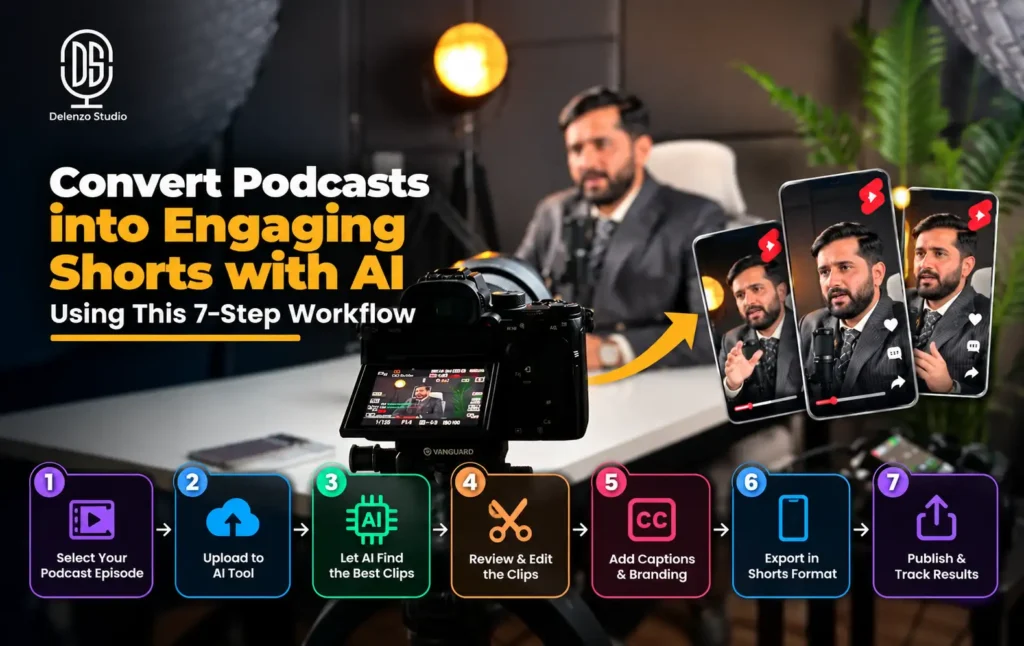
The 7-step workflow at a glance:
- Upload the full episode to an AI clipping tool
- Review AI suggestions instead of trusting the score
- Rewrite weak hooks so each clip stands alone
- Fix vertical framing for every speaker
- Correct Urdu-English captions by hand
- Polish pacing, audio, branding and B-roll
- Export and test for Shorts, Reels and TikTok
Step 1: Upload the Long-Form Podcast to the AI Clipping Tool
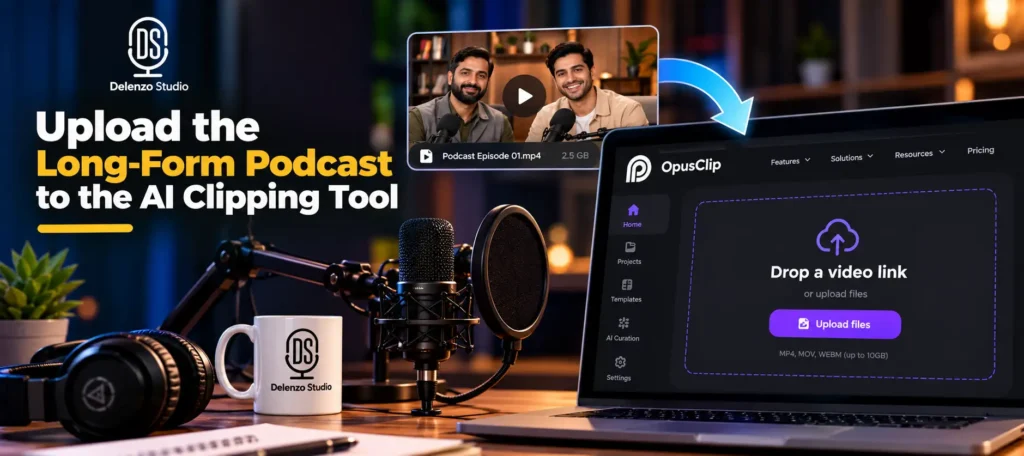
An AI podcast clip generator reads your transcript, spots likely highlights and cuts them into vertical clips. Popular options include OpusClip, Descript, Vizard and Riverside’s built-in clip feature. Most long video to short video AI tools follow the same basic pattern, so these steps carry over well.
Before you pay for any tool, check its language list for Urdu. OpusClip, for example, lists support for English, German, Spanish, French, Portuguese and around 20 other languages. Urdu support varies from tool to tool, and it decides how much caption fixing you’ll do later.
Pick Your Import Method
| Import method | Best for | Watch out for |
|---|---|---|
| Raw master upload | Highest quality source | Large files take longer to upload |
| Exported MP4 | A synced, edited version | Export at full resolution first |
| YouTube link | Episodes already published | Quality depends on the uploaded version |
For studio-recorded episodes, I prefer the exported MP4. The audio is already synced and edited, so the AI picks up every word.
Check Privacy Before You Upload
Cloud tools store your footage on their servers. That matters a lot for client work.
- Get written permission from the client before uploading their episode.
- Read the tool’s terms on file storage and AI training.
- Remove any segment a guest asked to cut before the file leaves your drive.
- Delete project files from the tool once the clips are final.
Settings to Select
- Language: Urdu if the tool lists it. Otherwise, use auto-detect and plan for heavier caption fixes.
- Aspect ratio: 9:16 for vertical platforms.
- Clip length: 30 to 90 seconds. Long enough for a full idea, short enough to hold attention.
- Keywords or topics: Add two or three main episode topics. These help the tool favor relevant moments.
- Speaker detection: On for any episode with two or more people.
- Captions: On, but treat them as a rough first draft.
Step 2: Review the AI-Suggested Clips Instead of Trusting the Score
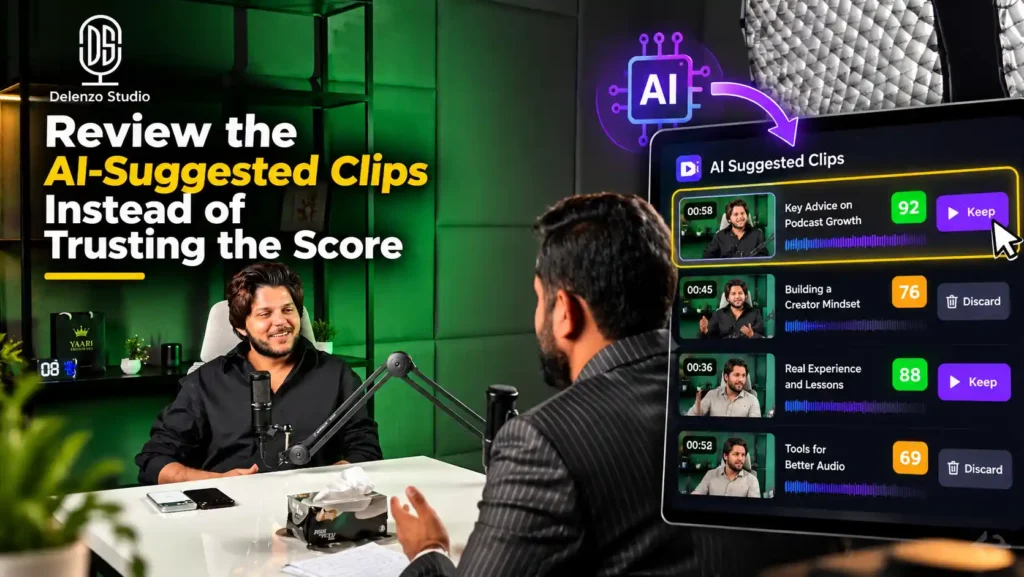
Once processing finishes, the tool hands you a list of suggestions. This is where my AI clip review workflow really begins.
My goal is simple. Every clip must make sense to someone who never watched the full episode. I call these context-safe podcast clips.
Here’s how a review usually looks. Each candidate gets one of three decisions:
| AI Candidate | Decision | Why |
|---|---|---|
| Clip A: Guest explains the biggest mistake new podcasters make | Keep | Opens with a direct claim, gives one specific example and ends on a complete lesson. |
| Clip B: Host reacts to a story the guest told earlier | Reject | The story came 10 minutes earlier. Viewers hear the reaction but never the cause. |
| Clip C: Guest shares a budget tip for starting a podcast | Re-cut | Useful topic, but the first 3 seconds were filler. The start point moves to the actual tip. |
The Editorial Checks I Use on Every Candidate
- Hook strength: The opening line should grab attention on its own.
- Standalone meaning: A new viewer must follow the point without the full episode.
- Emotional payoff: Look for a laugh, a surprise or a useful lesson.
- Specificity: Real numbers, names and examples beat vague advice.
- Repetition: Drop clips that repeat a point already covered by a better one.
- Guest credibility: The clip should show why this person is worth hearing.
- Tidy ending: It should finish on a complete thought, not mid-sentence.
About That Virality Score
Many tools show a virality score on each clip. OpusClip says its AI generates a score to show the virality potential of each clip. Treat that number as a hint, not proof.
The score can’t know your audience, your niche or your posting history. A human review of viral score results catches clips that look good on paper but confuse actual viewers. In practice, a low-scored clip with one solid lesson often beats a high-scored clip that only works in context.
Step 3: Rewrite the Hook So the Clip Works Without the Full Episode
People scroll fast. You get about two seconds to tell them what this clip is about.
Most podcast clips fail right here. The AI cuts from where a topic started in the conversation, not where it gets interesting.
What I Trim from the Opening
- Greetings and small talk
- Filler setups like “so basically” or “okay, so”
- References such as “as I said earlier” or “like we discussed”
- Inside jokes that only make sense in the full episode
When to Add a Text Hook
Sometimes the best moment starts with a line that needs a little setup. In those cases, I add a short text hook or title card on screen.
An effective text hook names the topic plainly. For example, “Why most new podcasters quit after episode 5” tells the viewer what they’re about to hear.
Keep the Speaker’s Meaning Intact
This is the one rule in short-form video editing I never bend. Never make a guest sound stronger, harsher or more certain than they were.
- Don’t stitch two separate sentences into one new claim.
- Don’t cut a qualifier like “in my experience” if it changes the meaning.
- Keep quotes in on-screen text word for word.
Your guest trusted you with their words. Protect that trust, and they’ll happily share your clips.
Step 4: Fix Vertical Framing for One, Two or Multiple Speakers
Auto-reframing is one of the most helpful AI features. It’s also where I find the most mistakes.
Proper podcast video vertical framing keeps the right face in shot at the right time. AI face tracking often gets this wrong. It can center the listener instead of the speaker or crop out microphones. It can also jump awkwardly when two people talk at once.
I review every automatic 9:16 crop manually. No exceptions.
Choosing a Layout for Two-Person Podcasts
A multi-speaker vertical crop depends on how the conversation flows. Here is how I decide:
| Layout | When to use it |
|---|---|
| Active-speaker crop | One person talks for most of the clip |
| Split-screen | Quick back-and-forth, or the listener’s reaction matters |
| Punch-in | You want to stress a key line or emotion |
| Wider frame | Both people react together, or a crop would cut someone off |
Solo episodes are the easiest. A centered crop with good headroom usually works.
For three or more speakers, avoid fast crop jumps. Use a wider frame or a grid layout when reactions matter.
My Framing Checklist
- Headroom: Leave a little space above the head, but not too much.
- Eye line: Eyes should sit roughly in the upper third of the frame.
- Subtitles: Keep them away from chins, mouths and hands.
- Microphones: Cropping half a mic looks sloppy, so show it fully or remove it from the frame.
- Graphics: Keep logos and text away from the edges, where platform buttons and usernames appear.
If the Source Was Multi-Camera
For studio multi-camera episodes, I switch cameras first, then reframe. Each angle is already composed, so you make fewer crop decisions and the clip feels steadier.
Reframing each angle separately gives tighter control, but it takes much longer. Save that for clips where one key reaction needs perfect framing.
Vertical clips are only as good as the horizontal footage behind them. These camera placement and framing rules for multi-guest podcasts make every crop easier later.
Step 5: Correct Urdu-English Captions by Hand
This step matters most for Pakistani podcasts. Most guides skip it because they’re written for English-only shows.
AI captions for podcast clips are a decent first draft. However, Pakistani conversations rarely stay in one language. Guests switch between Urdu, English and Roman Urdu, sometimes inside one sentence.
That’s where Urdu-English podcast captions break down. AI tools often guess, and those guesses look careless on screen.
Common Mistakes to Look For
| AI caption (before) | Corrected caption (after) | Error type |
|---|---|---|
| “Gold Berg” | “Gulberg” | Pakistani place name |
| “the Lenzo studio” | “Delenzo Studio” | Brand name |
| “zero ree hai” | “zaroori hai” | Urdu word heard as English |
| Speaker 1 shown for both voices | Host and guest labeled correctly | Speaker label |
My Caption Correction Checklist
These Roman Urdu transcription fixes happen line by line, with the audio playing:
- Spelling: Check every name, place and brand against a reference list from the guest.
- Consistent Roman Urdu: Pick one spelling style, like “nahi” or “nahin,” and stick with it.
- Language choice: Decide whether each word stays in Urdu script, Roman Urdu or English. Match what your audience reads most easily.
- Punctuation: Add commas and full stops so lines read naturally.
- Speaker attribution: Confirm labels match who is actually talking.
- Line breaks: Keep each caption line short so it fits on a phone screen.
- Timing: Captions should appear with the words, not before or after.
Ignore the headline accuracy numbers tools advertise. OpusClip, for instance, claims over 97% caption accuracy, but vendors usually test on their main supported languages. Mixed Urdu-English speech is a different challenge, so always budget time for this pass.
Well-recorded audio helps a lot here. A two-mic podcast setup gives the AI separate voices to transcribe.
Step 6: Do the Final Human Edit: Pacing, Audio, Branding and B-Roll
By now, the clip has a sharp hook, steady framing and correct captions. This last pass makes it feel finished.
AI does a fine job on rough cuts. Still, polished AI video clips always need a person checking the small details.
Pacing
Remove dead air and long pauses, but only where it helps. Cutting every breath makes people sound rushed and unnatural. A natural pause before a key point often adds weight.
Audio
Each cut can create a sudden jump in room tone or volume. Listen to the full clip with headphones. Smooth any level changes so the audio sounds like one continuous take.
If the source has hum or hiss, fix it before clipping. This guide on how to remove background noise from a video podcast covers the basics. For uneven volume, here’s how to normalize podcast audio in Audacity.
Branding
Apply your approved brand fonts, colors, logo placement and caption style. Consistency helps viewers recognize your clips before they even read the name.
B-Roll and Graphics
Add B-roll, screenshots or motion graphics only when they add context. A product shot works well when a guest mentions that product.
Don’t cover genuine facial reactions just to fill the screen. A guest’s surprised laugh often says more than any graphic. Smart editing knows when to stay out of the way.
Step 7: Export for Shorts, Reels and TikTok
Now it’s time to create YouTube Shorts from podcast footage and prepare the same clip for other platforms.
When you convert podcast video to Reels or TikTok, the vertical 9:16 format carries over. Each platform still has its own on-screen buttons, so check every version separately.
YouTube Shorts and Instagram Reels currently allow clips up to 3 minutes. TikTok accepts longer uploads, but shorter clips usually hold attention better.
The Export Preset I Recommend
| Setting | Value |
|---|---|
| Resolution | 1080 x 1920 |
| Aspect ratio | 9:16 |
| Format | MP4, H.264 |
| Frame rate | Same as source (25 or 50 fps) |
| Audio | AAC, 48 kHz |
Before You Publish
- Watch each export on an actual phone, not just your monitor.
- Confirm captions and faces sit away from platform buttons and text.
- Check the length against each platform’s limit before uploading.
Keep a Simple Naming System
Your podcast Shorts will need updates. A caption fix or a new platform requirement shouldn’t mean rebuilding the clip from scratch.
I keep one master file for each clip, plus versions with simple names. This format works well:
EP[number]_[ClipName]_[Platform]_v[number]
Titles and descriptions matter too. Our guide to YouTube SEO in Pakistan includes a section on Shorts SEO. After that, read our guide on using social media for podcast marketing.
Turn Podcast into Shorts with AI: What AI Gets Right and What I Still Check Manually
Here’s the quick summary of where AI saves time and where a person still matters.
| AI Is Useful For | Human Review Is Still Needed For |
|---|---|
| Scanning a long transcript quickly | Whether a moment has enough context to stand alone |
| Generating candidate cut points | Hook and ending quality |
| Automatic captions | Urdu-English spelling, names, speaker labels and timing |
| 9:16 reframing | Multi-speaker composition, cropped faces or mics and camera choice |
| Multiple versions quickly | Brand voice, factual accuracy, pacing and the final publish decision |
The pattern is obvious. AI video clips handle speed and volume well. Judgment, accuracy and taste still need a human. That’s why viral scores never get the final say in my process.
The same split applies across channel work. This guide on whether AI can be used for YouTube automation explains where else that line sits.
AI Podcast Clips vs Audiograms: Which Should You Use?
Video clips use your real camera footage. They show faces, reactions and body language, which builds trust fast.
Audiograms suit a different situation. They work well when your episode is audio-only, or when a waveform and graphic style fits your promotion plan.
If your show doesn’t have video yet, learn how to create eye-catching podcast audiograms instead. You can also compare the best tools for podcast audiograms.
How I Use the Finished Clips to Promote the Full Podcast
A clip shouldn’t be a dead end. Each one should point viewers somewhere useful.
Depending on the campaign, that might be the full episode, your YouTube channel or your Instagram profile. Add a pointer in the caption, a pinned comment or a link sticker.
Podcast Shorts work best as a trail back to the main show. When you create YouTube Shorts from podcast episodes regularly, each one becomes another doorway into your full catalog.
For the full plan, see how to promote a podcast with YouTube Shorts and Instagram Reels. For the wider local picture, here’s how to promote your podcast in Pakistan.
Want the Recording and Short Clips Handled for You?
You’ve now seen every step, from upload to export. It works, but it takes several hours, especially the caption fixes and framing checks.
If you’d rather focus on the conversation, our team can handle the rest. Book Delenzo Studio’s professional podcast studio in Lahore and leave the editing, highlight selection and social podcast clips to us.
Our Lahore podcast editing workflow follows the same human-reviewed process you just read, including Urdu-English caption correction by hand. It’s one part of our full podcast production workflow in Lahore, from recording to final clips.
After your clips are ready, our YouTube automation services in Lahore handle uploads, SEO, scheduling and channel work.
Planning something bigger than a podcast? Our professional video studio in Lahore handles wider branded video production too.
Frequently Asked Questions
Yes. AI clipping tools scan your podcast transcript, pick likely highlight moments and cut them into vertical clips with captions. A human should still review each clip before publishing.
Upload the episode to an AI clipping tool and set a 9:16 ratio. Keep clips that make sense alone. Fix hooks, framing and captions, then export for each platform.
Partly. AI can spot likely highlights using transcripts, speech patterns and virality scores. Still, it often misses context and weak hooks, so a human should approve every clip it picks.
Use an AI tool if you have time to review and fix clips yourself. Hire a podcast editor if you want consistent quality, accurate Urdu-English captions and less weekly work.
Review captions line by line with audio playing. Correct names, brands and Urdu words, keep one Roman Urdu spelling style, check speaker labels and sync timing with speech.