Getting camera placement Rules for multi-guest podcast video right is what separates a professional-looking show from a home recording. Most creators overlook it completely and wonder why their footage never looks quite right.
You finally set up your podcast studio, mics are ready and guests are seated. You hit a record, watch the playback, and something feels off. The audio is clean and the lighting looks decent, yet the video still feels amateur. Guests look awkward on screen, the energy feels flat, and viewers click away within the first thirty seconds.
The problem is not your camera. It is where you placed it.
Camera position controls how your guests look, how natural the conversation feels, and how credible your show appears to a first-time viewer. One wrong angle ruins an otherwise great episode.
This guide covers every rule, setup, and configuration you need. Whether you are recording your first episode or leveling up an existing setup, this is your complete camera placement guide for podcast video.
Why Camera Placement Matters More Than Camera Quality
Camera placement directly impacts how professional your video podcast looks, often more than the camera itself. It dictates the story, lighting, and usability of your footage before you even press record. A Sony A7III pointed at the wrong angle, sitting too high or too low, will deliver flat, unflattering footage that no amount of colour grading can fix. A basic mirrorless camera positioned at eye level with proper framing will consistently outperform it.
Position affects how guests look on screen, how natural their energy feels, and how much viewers trust what they are watching. A poorly placed camera makes even confident guests look awkward and disconnected.
Good placement also makes editing cleaner. Smooth cuts between angles feel natural when every camera follows the same rules. Bad placement creates jarring transitions that break the viewer experience completely.
Before spending money upgrading your gear, fix your placement first. The results will surprise you.
The 5 Core Camera Placement Rules for Podcast Video
These five rules apply to every podcast format. Two guests, four guests, remote or in-person. Learn these first and everything else becomes easier.
Rule 1 — Eye Level Is Always Correct
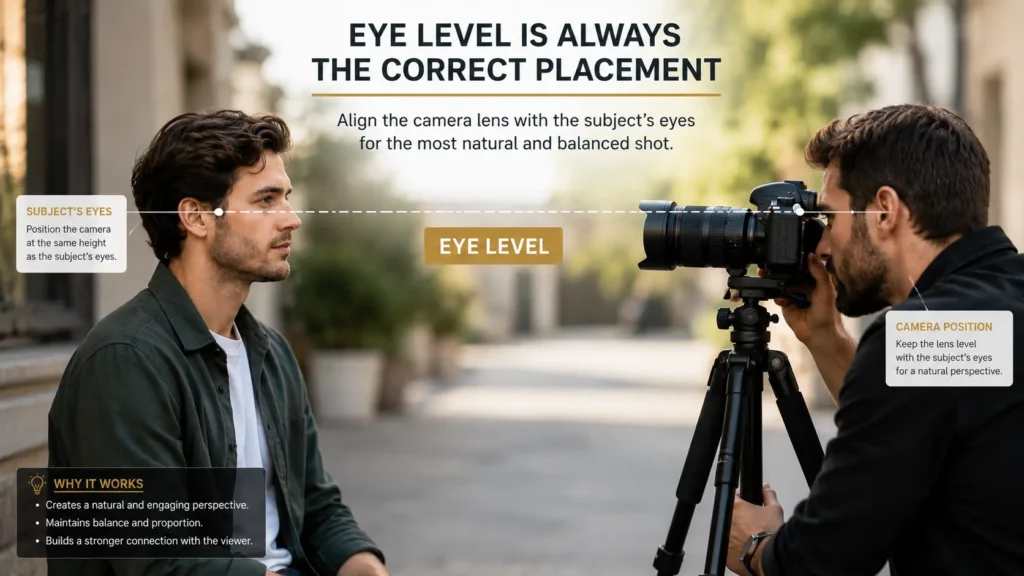
Place your camera so the lens sits at the same height as your guest’s eyes. Not above. Not below.
When the camera is too high, guests look small and diminished. When it is too low, it creates an unflattering upward angle. Neither looks professional.
Eye level creates a natural, conversational feel. It replicates how two people look at each other in real life. Viewers feel like they are in the room with your guests.
Use a tripod or adjustable arm to set the exact height. Check the monitor before recording. Adjust until the eyes sit in the upper third of the frame.
This one rule alone will immediately improve your video quality.
Rule 2 — The Rule of Thirds
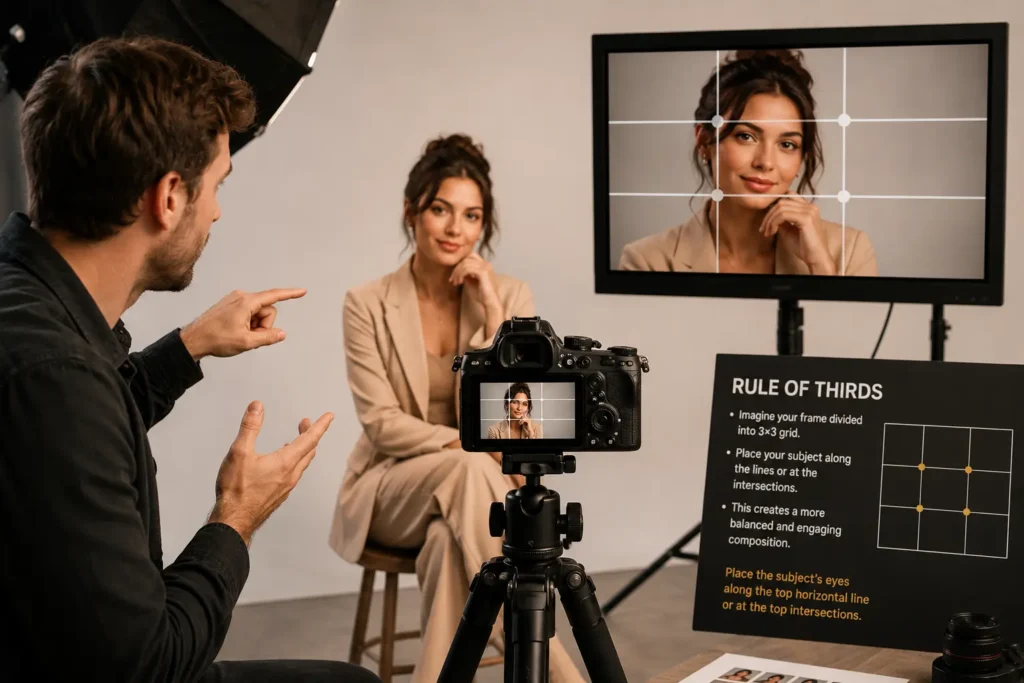
Divide your frame into a 3×3 grid. Nine equal sections. Your guest’s eyes should sit along the top horizontal line of that grid.
Most cameras have a grid overlay option in the display settings. Turn it on during setup.
The subject’s face should occupy the centre or slightly off-centre column. Leave some natural space on the side they are facing or speaking toward.
This creates a visually balanced shot. It feels professional without looking rigid. It also matches how broadcast television frames its on-camera talent.
Apply the rule of thirds to every camera in your setup. Consistent framing across all shots makes your edited video feel cohesive.
Rule 3 — The 180-Degree Rule
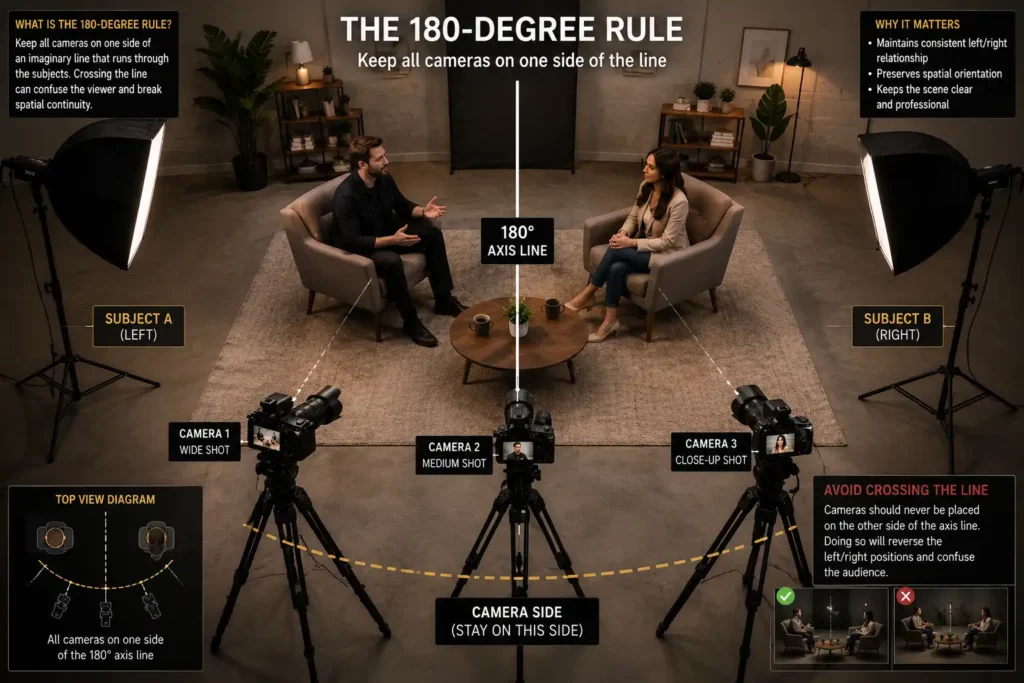
Imagine a straight line running through the centre of your recording space. All your cameras must stay on one side of that line.
This is the 180-degree rule. It is a filmmaking fundamental that keeps spatial relationships consistent for the viewer.
When you break this rule, guests appear to switch sides between cuts. It confuses the viewer. The conversation feels visually incoherent even if the audio is perfect. In a multi-camera podcast setup, this matters even more. With three or four cameras running simultaneously, it is easy to accidentally place one on the wrong side.
Before recording, mark your 180-degree line. Every camera lens must face the same general direction from that line.
Rule 4 — Consistent Framing Across All Cameras

Your close-up shots should all be framed the same way. Chest up, eyes in upper third, similar headroom above each guest.
Inconsistent framing creates an uneven feel during editing. One guest looks too zoomed in. Another has too much empty space above their head. The cuts feel random rather than deliberate.
Spend time before each recording session matching your camera frames. If you use multiple cameras of the same model, this is straightforward. If you mix camera types, adjust focal length and distance to match the field of view as closely as possible.
Consistent frames are a sign of a professional production. Viewers notice it subconsciously even if they cannot name what they are seeing.
Rule 5 — Eyeline Alignment
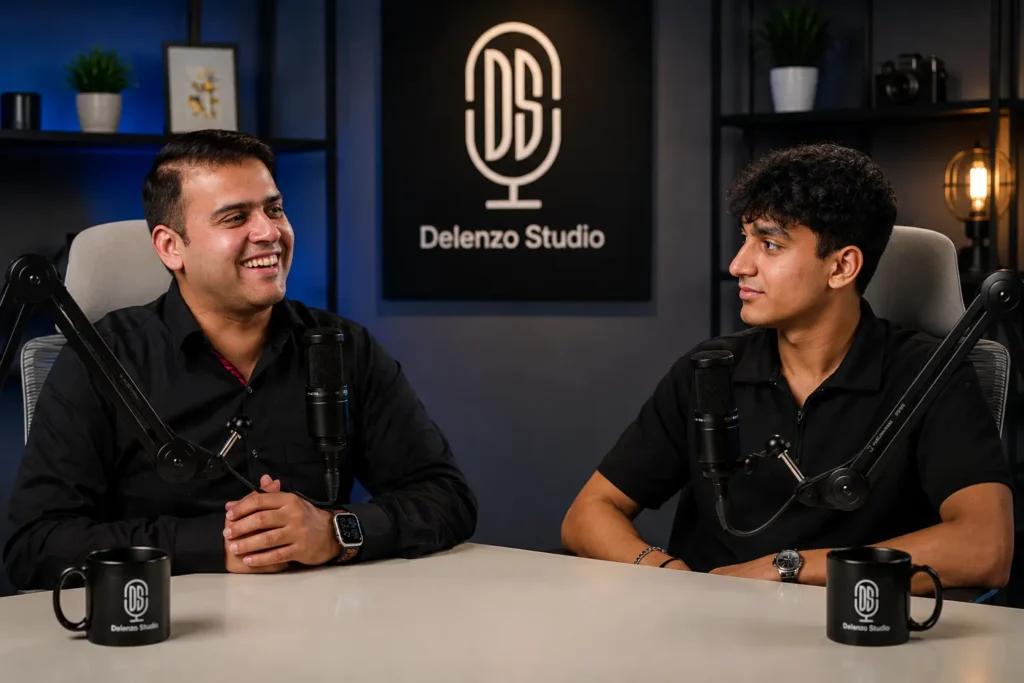
Eyeline podcast camera placement means your guests should appear to look at each other naturally on screen. Their eyelines should cross within the frame, not miss each other.
When a guest looks slightly left and the other looks slightly right, they appear to be looking at each other. This creates a natural conversational dynamic on screen.
If both cameras point straight forward and both guests face directly into their respective lenses, they appear to look past each other. It feels disconnected and flat. Angle each camera slightly inward. Even a few degrees makes a significant difference. Test it before recording by watching the monitor and adjusting until the eyelines feel natural.
Camera Setup by Guest Count — Complete Configurations
Rules are one thing. Practical setups are another. Here is exactly how to configure your cameras based on how many people are in your episode.
Two-Person Setup (Host + One Guest)
This is the most common podcast format and the most forgiving for camera placement.
The standard three-camera approach works best here.
Camera 1 — Wide shot. Place it directly across from both participants. This captures both people in one frame. It is your establishing shot and your safety net during editing. The wide shot podcast camera should sit slightly back and centred between the two seats.
Camera 2 — Host close-up. Position this camera at a slight inward angle toward the host. Eye level. Rule of thirds applied. The lens should be just to the side of the guest so the host appears to look slightly toward them.
Camera 3 — Guest close-up. Mirror image of Camera 2. Same height, same framing rules, angled slightly inward toward the host.
All three cameras must stay on the same side of the 180-degree line.
For a natural setup, place the host and guest at a slight angle to each other rather than directly face to face. A 45 to 90-degree angle between seats creates better eyeline dynamics and feels more conversational on camera.
Typical camera distance for close-ups in a studio setting is around 4 to 6 feet, though you should always adjust based on your lens focal length to maintain the right framing.
This setup is used daily at professional podcast studios across Pakistan, including the setup at Delenzo Studio in Gulberg Lahore, where Sony A7III cameras with Sigma lenses create clean, broadcast-quality close-ups for every guest.
Three-Person Setup (Host + Two Guests)
Three people on camera requires more planning. The most common seating arrangement is a slight arc or curved row facing the primary camera position. This is where the three camera podcast setup gets slightly more complex, but still very manageable.
Camera 1 — Wide shot. Centre position, pulled back enough to capture all three participants comfortably. This shot anchors your edit and gives context to the full conversation.
Camera 2 — Host close-up or two-shot. If your host sits in the centre, Camera 2 captures them alone. If the host sits on one end, consider a two-shot that frames the host and the nearer guest together.
Camera 3 — Guest side close-up. This covers the two guests on the opposite side. You can alternate between individual close-ups in post-production if you shoot a two-shot here, or add a fourth camera if budget allows.
The key challenge with three people is maintaining eyeline consistency. The host needs to naturally address both guests. Position the host slightly forward or in a central seat so their body and eyeline can shift comfortably between the two guests.
Keep all cameras behind the same 180-degree line. Mark your line before guests sit down. Adjust all tripods and mounts before the session begins.
Microphone and camera boom placement becomes critical here. Make sure no mic stands or cables appear in any frame. Do a clean sweep of every camera monitor before hitting record.
Four-Person Setup (Host + Three Guests / Roundtable)
Four people on camera is the most demanding configuration. A roundtable format is the most practical and visually interesting arrangement for this guest count.
Camera placement for multi-guest podcast recording with four participants requires at least four cameras for proper coverage. Here is a workable configuration.
Camera 1 — Wide establishing shot. Pull this camera far enough back to capture the full table and all four participants. Use this shot to open the episode and return to it during topic transitions.
Camera 2 — Host close-up. Dedicated close-up for the host. Consistent framing, eye level, rule of thirds.
Camera 3 — Guest pair shot. Capture the two guests sitting across from the host. Frame them both in a two-shot with balanced headroom and consistent eye levels.
Camera 4 — Individual guest close-up. Dedicate this to the most frequently speaking guest or rotate its use in post-production across all three guests.
For a true roundtable where all four participants sit around a circular or square table, the 180-degree rule applies to your primary shooting axis. Decide which half of the table is your “camera side” and never cross that line with any camera.
Lighting becomes more complex with four people. Each participant needs even, flattering light. Shadows from adjacent guests are a common problem. Adjust your key lights individually before the session.
Camera placement for multi-guest podcast sessions with four people also requires more cable management. With four cameras, four tripods, and four mics, the floor and desk space fill quickly. Plan your layout before guests arrive.
This is the format where a dedicated studio space genuinely shows its value. At Delenzo Studio, the event studio and podcast rooms are designed specifically for multi-guest productions. The layout accommodates full roundtable setups with pre-configured camera positions, professional lighting grids, and managed cable runs so nothing appears in frame.
Practical Tips That Apply to Every Setup
These tips apply to every recording session regardless of guest count or studio size:
- Always record a test run before your actual session. Watch every camera feed on a monitor and check eyelines, framing, and the 180-degree line before guests arrive.
- Label your camera feeds as Camera 1, Camera 2, and Camera 3. It saves significant time during editing and keeps your workflow organised.
- Use matching colour profiles across all cameras. If you mix camera brands, shoot in a flat profile and colour grade in post to create a consistent look throughout the episode.
- Keep your background intentional. Best camera angles podcast 2026 trends lean toward clean, simple backgrounds with subtle depth. Avoid busy backgrounds that visually compete with your guests.
- Plan for both audio and video together. A good video podcast camera setup always considers microphone positioning. Boom mics, desktop mics, and lavaliers all occupy space, so map out both before the session begins.
- Treat camera framing rules as tools, not rigid laws. Once you understand why each rule exists, you will confidently know when a slight adjustment serves the shot better.
Conclusion
Camera placement for multi-guest podcast video becomes straightforward once you understand the five core rules. Eye level, rule of thirds, the 180-degree line, consistent framing, and eyeline alignment cover almost every situation you will encounter. Match your camera configuration to your guest count and always fix your placement before upgrading your gear.
If you want to skip the trial and error, Delenzo Studio in Gulberg Lahore offers pre-configured multi-camera podcast setup options for two, three, and four-guest recordings. Sony A7III cameras, RØDE mixers, and professional lighting are all ready before you walk in.
Camera placement for multi-guest podcast production is a skill. Practice it, test it, and refine it with every episode.
Read Next: Best Podcast Camera for Studio Recording in 2025
Frequently Asked Questions
A two-guest podcast needs a minimum of three cameras. A three-guest setup works best with three to four cameras. A four-guest roundtable requires at least four cameras. Always include one wide shot camera and dedicated close-ups for the host and each guest.
The 180-degree rule means all cameras must stay on one side of an imaginary line running through your recording space. Breaking this rule makes guests appear to switch sides between cuts, creating visual confusion that disrupts the viewer experience regardless of audio quality.
Position every camera at eye level with your guests. Place close-up cameras slightly to the side of each guest so their eyelines cross naturally on screen. Keep all cameras behind the same 180-degree line to maintain consistent spatial relationships throughout the recording.
Frame each guest from the chest upward with their eyes sitting along the upper third of the frame. Leave natural headroom above and apply the rule of thirds for balance. Keep framing consistent across all close-up cameras for clean, professional cuts during editing.
The wide shot captures all guests in one frame and serves as your establishing shot. It gives viewers spatial context, shows the full conversation dynamic, and acts as a reliable fallback during editing when close-up cuts need a natural transition between speakers.