Choosing the best audio format for podcast production is one of those decisions that trips up even experienced creators. You finish recording a solid episode, hit export, and suddenly you are staring at a dropdown full of options. MP3, WAV, AAC, FLAC. Each one sounds important. None of them come with a plain explanation. The wrong choice at the wrong stage can quietly damage your audio quality before a single listener ever presses play.
This guide explains every format simply, tells you exactly when to use each one, and gives you a workflow you can follow from recording to publishing.
The Formats You Actually Need to Know
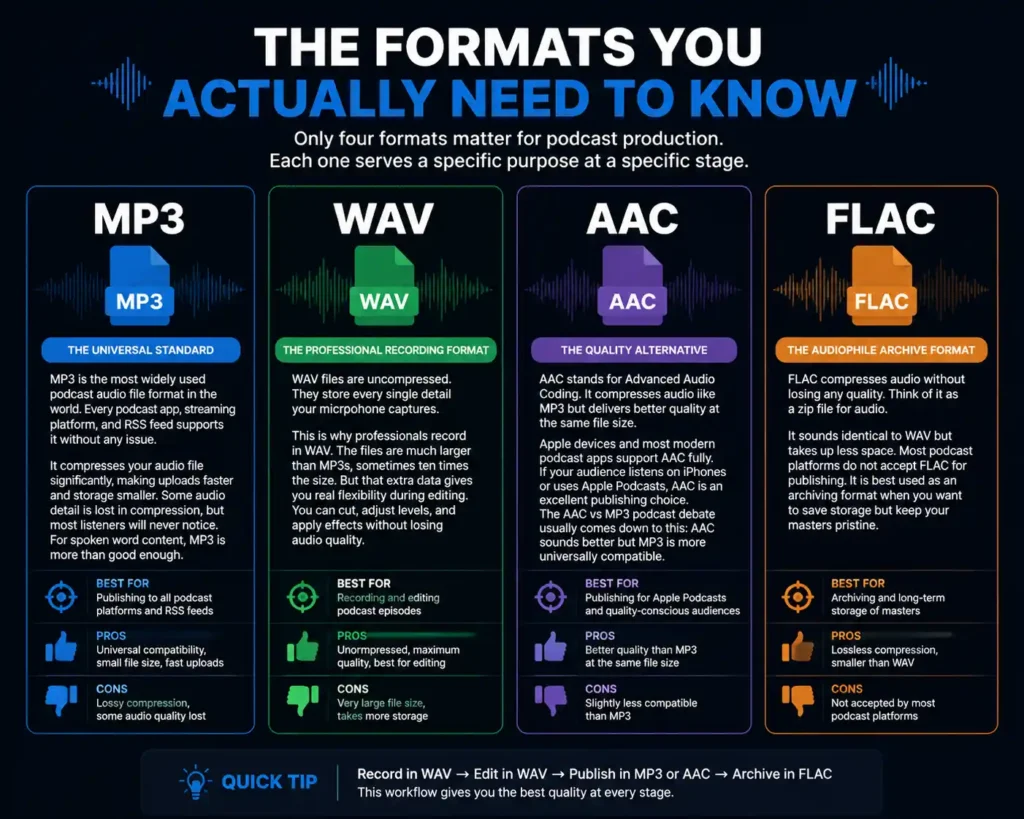
Most podcasters waste time researching formats they will never use. In reality, only four formats matter for podcast production. Each one serves a specific purpose at a specific stage. Understanding the difference between them saves you from costly mistakes and keeps your audio quality intact from recording to publishing.
MP3 — The Universal Standard
MP3 is the most widely used podcast audio file format in the world. Every podcast app, streaming platform, and RSS feed supports it without any issue. It compresses your audio file significantly. This makes uploads faster and storage smaller. Some audio detail is lost in compression, but most listeners will never notice. For spoken word content, MP3 is more than good enough.
WAV — The Professional Recording Format
WAV files are uncompressed. They store every single detail your microphone captures. This is why professionals record in WAV. The files are much larger than MP3s, sometimes ten times the size. But that extra data gives you real flexibility during editing. You can cut, adjust levels, and apply effects without losing audio quality. WAV is your go-to format for podcast recording format and editing sessions.
AAC — The Quality Alternative
AAC stands for Advanced Audio Coding. It compresses audio like MP3 but delivers better quality at the same file size. Apple devices and most modern podcast apps support AAC fully. If your audience listens on iPhones or uses Apple Podcasts, AAC is an excellent publishing choice. The AAC vs MP3 podcast debate usually comes down to this: AAC sounds better but MP3 is more universally compatible.
FLAC — The Audiophile Archive Format
FLAC compresses audio without losing any quality. Think of it as a zip file for audio. It sounds identical to WAV but takes up less space. Most podcast platforms do not accept FLAC for publishing. It is best used as an archiving format when you want to save storage but keep your masters pristine.
What About OGG, AIFF, and Others?
OGG, AIFF, and similar formats are rarely used in standard podcast workflows. AIFF is Apple’s uncompressed format, identical in quality to WAV. It works well for recording and editing on Mac but offers no advantage over WAV on other systems. OGG is open-source and mostly found in gaming and web applications. Podcast platforms almost never support it for publishing. Unless a specific tool requires one of these formats, your workflow does not need them.
The Three-Stage Workflow — Why Different Stages Need Different Formats
Many beginners use the same format from start to finish. That is a common mistake. Each production stage has a different job, and the right podcast audio file format depends on what that stage demands.
Stage 1 — Recording (WAV or AIFF)
Always record in WAV or AIFF. These uncompressed formats capture every detail your microphone picks up. You want maximum quality at this stage because everything you do later depends on this raw material. If you record in MP3, any edits you make will degrade the audio further. Starting clean means finishing clean.
Stage 2 — Editing (WAV or AIFF)
Keep your project files in WAV or AIFF throughout the editing process. Every cut, EQ adjustment, and noise reduction pass works on the full-quality data. Editing compressed audio is like photocopying a photocopy. Quality drops with each generation. WAV vs MP3 recording comparisons always show WAV preserving more detail, and that matters when you are fixing breath noise or mixing music beds.
Stage 3 — Publishing (MP3 or AAC)
Once your edit is final, export a compressed version for publishing. MP3 at 128 kbps mono is the industry standard for most talk podcasts. It keeps file sizes small for listeners on mobile data. AAC works well if your audience is primarily on Apple devices. Never upload your raw WAV to your podcast host. The file size will frustrate listeners and strain your storage quota.
Bitrate Guide — What Numbers Mean and Which to Use
Bitrate measures how much audio data plays per second. Higher bitrate means better quality and larger file size. Lower bitrate means smaller files but less detail. Getting this right is a core part of understanding podcast audio quality settings.
For Spoken Word Podcasts (Interviews, Solo Shows, Storytelling)
128 kbps mono is the sweet spot. Human speech does not need the full stereo field. Mono keeps the file compact. Listeners on earbuds or phone speakers will hear absolutely no difference. This setting is the best bitrate for podcast content that is conversation-based.
192 kbps stereo makes sense if you have sound effects, music transitions, or a distinct stereo setup. It produces a noticeably richer listening experience. File sizes grow proportionally, so weigh that against your hosting plan.
For Music-Heavy Podcasts
Use 192 to 256 kbps stereo. Music has wide frequency ranges and stereo separation that benefit from higher bitrates. A true crime podcast with dramatic scoring or an audio drama with full sound design will sound noticeably better at these settings. Dropping to 128 kbps will flatten the music and affect the listener’s experience.
What Settings to Use in Your Editing Software
These are the exact export settings that match professional standards. Bookmark this section. It covers the best podcast export settings for the most common scenarios.
For standard talk podcast export (MP3):
- Format: MP3
- Bit Rate: 128 kbps
- Channels: Mono
- Sample Rate: 44100 Hz
- Bit Depth: 16-bit
For music-heavy or audio drama export (MP3):
- Format: MP3
- Bit Rate: 192–256 kbps
- Channels: Stereo
- Sample Rate: 44100 Hz
- Bit Depth: 16-bit
For recording sessions:
- Format: WAV
- Sample Rate: 44100 Hz or 48000 Hz
- Bit Depth: 24-bit
- Channels: Mono for single mic / Stereo for multi-mic
The 24-bit depth during recording gives you extra headroom. It means quieter moments stay clear and louder peaks do not distort. You can always convert down when exporting. You cannot add detail back that was never captured.
Studios like Delenzo Studio in Gulberg Lahore already configure these exact settings before your session starts. Every recording is captured in WAV at the correct sample rate and bit depth. Your raw files come ready for professional editing from the first take.
Quick Reference — The Format Decision by Situation
Use this table whenever you need a fast answer. It covers every common MP3 vs WAV podcast decision.
| Situation | Recommended Format | Settings |
| Recording your episode (solo or multi-guest) | WAV | 24-bit, 48000 Hz 48 kHz is the modern standard for digital and video compatibility. For multi-guest, record each mic on a separate track for full editing control. |
| Editing and post-production | WAV or AIFF | 32-bit float preferred 32-bit float gives maximum headroom and prevents clipping. |
| Publishing a video podcast | MP4 | H.264, 1080p, AAC audio MP4 is universally supported across YouTube, Spotify, and all major platforms. |
| Publishing a talk show | MP3 | 128 kbps, Mono, 44100 Hz Mono halves file size with no impact on voice clarity. |
| Publishing music-heavy content | MP3 or AAC | 192–256 kbps, Stereo, 44100 Hz Stereo preserves music depth and imaging. |
| Archiving master files | FLAC or WAV | 24-bit, original sample rate FLAC saves storage without any quality loss. |
| Limited hosting storage | MP3 | 128 kbps, Mono, 44100 Hz Best balance between file size and speech clarity. |
Conclusion
Getting the right format wrong is rarely about knowledge. It is about not having a clear workflow. Record and edit in WAV for maximum quality. Export in MP3 or AAC for publishing. Match your bitrate to your content type. This approach covers the full range of the best audio format for podcast decisions without overthinking it.
The format question matters most when something goes wrong. Listeners notice clipped audio, muffled voices, and boxy sound. They may not know what caused it, but they will stop listening. Getting these technical details right means your content gets the audience it deserves.
If you want your recording environment to match your export quality, a properly treated studio makes a measurable difference. Delenzo Studio in Lahore records every session in WAV at studio-grade settings. Your raw files arrive clean, correctly formatted, and ready for post-production from the very first take. See Delenzo Studio’s full services, spaces, and pricing for 2026.
Frequently Asked Questions
Always record in WAV. It captures uncompressed audio with full detail, giving you clean files to edit. Export to MP3 only at the publishing stage. Recording in MP3 from the start permanently reduces your audio quality.
Use 128 kbps mono for talk and interview podcasts. It keeps file sizes small without affecting voice clarity. For music-heavy episodes, use 192 to 256 kbps stereo to preserve sound depth and imaging.
AAC delivers better audio quality than MP3 at the same file size. It works well on Apple Podcasts and Spotify. MP3 remains more universally compatible across all platforms, making it the safer default for most podcasters.
Use mono for talk, interview, and solo podcasts. Human speech does not benefit from stereo separation. Mono halves your file size with no impact on clarity. Use stereo only when your episode includes music or sound design.
Record at 44100 Hz or 48000 Hz. Both are broadcast-standard sample rates. Use 48000 Hz if your podcast includes video, as it aligns with standard video production requirements across all editing software.`