Publishing a podcast means uploading your finished episode to a podcast hosting platform, which generates a podcast RSS feed. Directories like Spotify, Apple Podcasts, and YouTube read this feed automatically, so submitting it once is all it takes. This guide covers how to publish a podcast after recording, right after your editing is finished. Recording and editing are only half the job. What happens next decides whether listeners ever find your show.
If you have not exported your final audio file yet, read our guide on which audio file format to use for your podcast first, then come back to this checklist.
What You Need Before You Publish
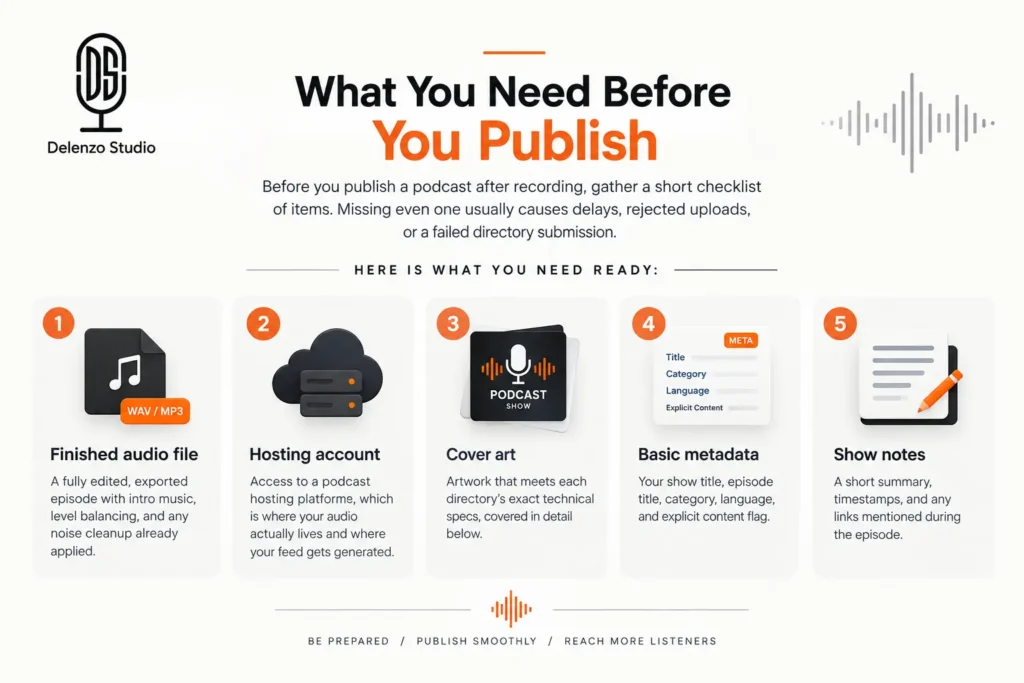
Before you publish a podcast after recording, gather a short checklist of items. Missing even one usually causes delays, rejected uploads, or a failed directory submission.
Here is what you need ready:
- Finished audio file: A fully edited, exported episode with intro music, level balancing, and any noise cleanup already applied.
- Hosting account: Access to a podcast hosting platform, which is where your audio actually lives and where your feed gets generated.
- Cover art: Artwork that meets each directory’s exact technical specs, covered in detail below.
- Basic metadata: Your show title, episode title, category, language, and explicit content flag.
- Show notes: A short summary, timestamps, and any links mentioned during the episode.
Show notes deserve more attention than most podcasters give them. A clear summary helps new listeners decide whether to press play. Timestamps make it easy to jump to a specific segment, which matters for longer interview-style episodes. Search engines also read show notes. Well-written ones can bring in listeners who found you through a regular web search, not just a podcast app.
Most hosting platforms walk you through these fields step by step during setup. Preparing everything in advance still saves time and avoids frustrating edits once you are mid-submission.
Choosing the right host matters more than most new podcasters realize. Look for reliable uptime, clear analytics, and one-click distribution to major directories. A cheap host that drops your feed occasionally costs more in lost listeners than it ever saves in fees.
A few other details are worth checking before you commit to a host:
- Storage limits. Some hosts cap how many hours of audio you can upload each month.
- Distribution reach. Confirm the host actually submits to Apple, Spotify, YouTube, and Amazon Music directly.
- Feed ownership. You should always be able to export your RSS feed and move hosts later without losing episodes.
- Support quality. A responsive support team matters most during your very first submission, when small errors are common.
None of these details need to be perfect on day one. But checking them upfront avoids a painful migration a year into your show.
Podcast Cover Art Requirements
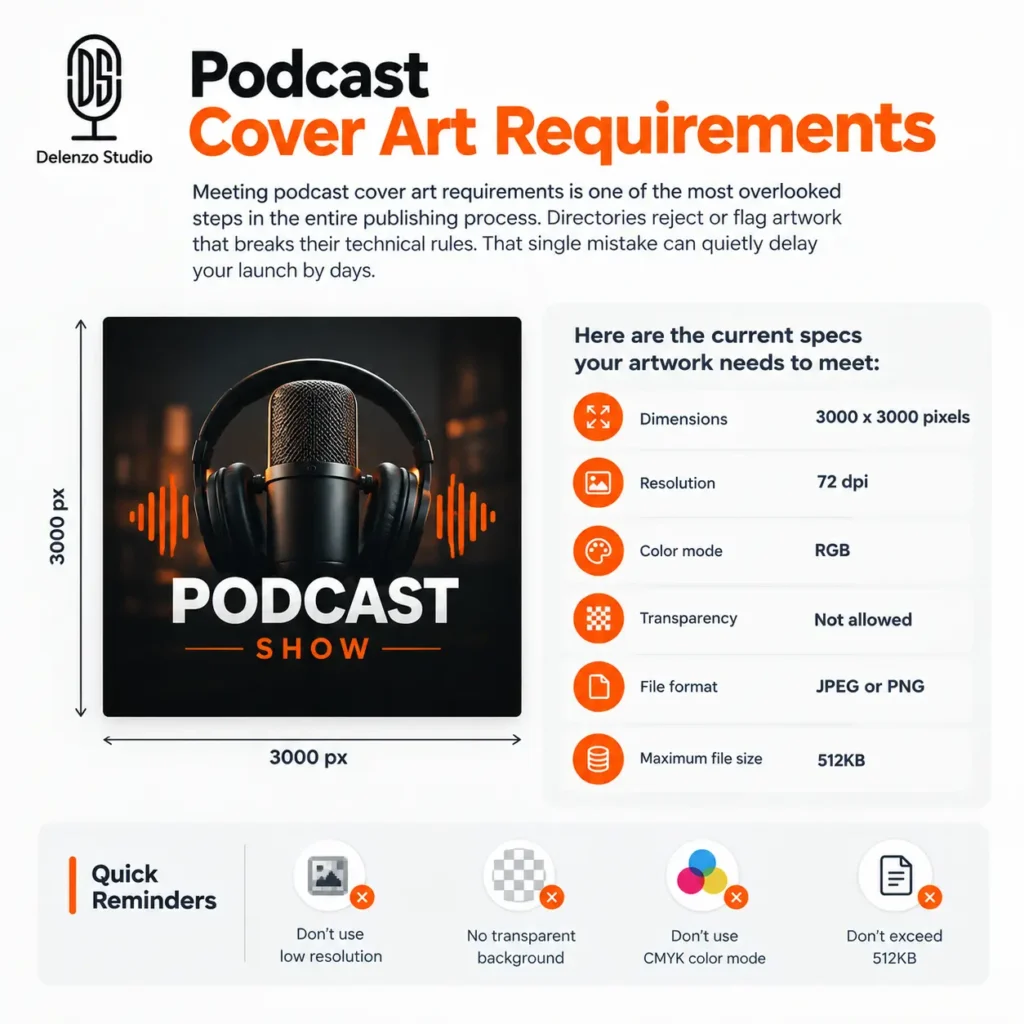
Meeting podcast cover art requirements is one of the most overlooked steps in the entire publishing process. Directories reject or flag artwork that breaks their technical rules. That single mistake can quietly delay your launch by days.
Here are the current specs your artwork needs to meet:
| Requirement | Specification |
|---|---|
| Dimensions | 3000 x 3000 pixels |
| Resolution | 72 dpi |
| Color mode | RGB |
| Transparency | Not allowed |
| File format | JPEG or PNG |
| Maximum file size | 512KB |
Meeting the technical checklist is only step one. Design quality decides whether your show earns a click once someone sees it inside a crowded directory list.
Test your artwork’s readability at 150 by 150 pixels before uploading it anywhere. That is roughly how small it appears inside most podcast apps, especially on phones. If your show title is not legible at that tiny size, simplify the design right away. Fewer words, bolder fonts, and stronger contrast almost always solve the problem.
A few extra tips are worth following here:
- Avoid thin, decorative fonts that blur once shrunk down.
- Keep your main subject or logo centered, since some apps crop the edges slightly.
- Stick to two or three colors for a cleaner, more recognizable look.
- Reuse the same visual style across seasons, so returning listeners recognize your show instantly.
If design is not your strength, this is one area worth outsourcing. First impressions inside a directory list happen in under a second, and cover art carries most of that weight.
It also helps to think of your cover art as a long-term brand asset, not a one-time task. Changing it too often confuses returning listeners and can reset some directory rankings. Pick a design you can stick with for at least a full season. Refine it gradually instead of overhauling it each time.
Many creators try to design their own cover art using free templates, which works fine for a quick start. Others bring in a designer once the show gains traction, since branding tends to matter more as an audience grows. Either path is fine, as long as the technical specs above are always respected first.
A Quick Note on Outdated Publishing Advice
Many older guides still mention submitting your show to Google Podcasts or Stitcher. Both are no longer active submission priorities as of 2026. The platforms were either shut down or folded into other services.
Following that kind of outdated checklist wastes real time without adding real reach. Focus your energy instead on the four directories that actually matter today:
- Apple Podcasts
- Spotify
- YouTube
- Amazon Music
These four platforms cover most podcast listeners worldwide. A handful of active directories beats a dozen outdated ones nobody checks anymore.
What Happens After You Publish
Once your podcast RSS feed is approved, every future episode only needs one step: upload it to your host. It then appears everywhere else within a few hours, with no repeated submissions.
If you are wondering how to upload a podcast to YouTube, most hosting platforms handle this automatically. They generate a YouTube-compatible feed that turns each episode into a video, complete with your cover art and waveform.
For better discoverability, spend time on YouTube podcast upload optimization. Write accurate titles, add useful tags, and choose a clear thumbnail for each episode. A short, platform-specific description also helps YouTube’s search signals.
Checking analytics regularly pays off too. Most hosts show which episodes get downloaded most and which directories send the most traffic, helping you shape future topics.
Once live, promotion matters. Short audiogram clips are an easy way to bring new listeners to a fresh episode. Our guide on creating eye-catching audiograms shows exactly how.
Common Mistakes When Publishing a Podcast
Even experienced creators run into avoidable problems when trying to get a podcast live. Most of these mistakes are easy to fix once you know to look for them. Here are the ones we see most often, along with why each one causes trouble.
- Skipping the hosting platform entirely. Uploading an audio file directly to Spotify or Apple Podcasts simply does not work. Neither platform accepts new shows this way, since both require a hosted feed sitting in between.
- Ignoring how cover art shrinks. Artwork that looks sharp at full size often becomes blurry once shrunk to the tiny size most apps actually display.
- Submitting without a live episode. Most directories require at least one already-published episode before they approve a new submission.
- Following outdated advice. Guides that still recommend platforms no longer relevant in 2026 waste effort better spent elsewhere.
- Not confirming music or clip rights. Using unlicensed music or third-party audio clips risks a takedown notice after your episode is already live.
Avoiding these five mistakes solves most of the friction new podcasters run into during their first few launches. Slowing down at each step almost always beats rushing an episode online.
A simple pre-launch checklist helps too. Confirm your audio is exported correctly, your artwork passes the size test, and metadata is filled in. Also check that clips are licensed. Do a quick test listen on your phone, using the app listeners actually use. Volume and quality can sound different there.
Conclusion: Getting Your Episode Out to Listeners
Now that you understand how to publish a podcast after recording, the process feels far less intimidating. Choose a reliable host, meet each platform’s cover art and metadata requirements, and submit your RSS feed once. After that, every new episode distributes automatically.
This holds true whether you follow a general workflow or a podcast publishing guide Pakistan creators searched for. The fundamentals stay the same no matter your location or host.
If you would rather have the process handled for you, our team offers full podcast production services in Lahore. This covers everything from editing to ongoing uploads.
Once live, do not stop at publishing. Check out our guide on turning episodes into audiograms to bring in fresh listeners.
Frequently Asked Questions
You need a finished, exported episode file and a podcast hosting account. You’ll also need compliant cover art, basic show metadata, and written show notes
A podcast RSS feed is a specialized XML text file holding your show’s data, episode details, and audio file links. Directories like Spotify read it automatically.
Podcast cover art should be 3000 by 3000 pixels, 72 dpi, and RGB color. Save it as a JPEG or PNG under 512KB, with no transparency.
Upload your finished episode to a hosting platform, which generates an RSS feed. Submit that feed once to each directory, and future episodes sync automatically.
After you submit your RSS feed, most directories review and approve new shows within a few days. Some approvals can take up to two weeks.

